Updated: September 22, 2026 By: Marios
A short animal video becomes more memorable when its sounds advance the plot. In this 15-second horizontal story, a black-and-white cat tests three colored floor buttons beside an automatic feeder. Each press creates a new response, but the last button changes the meaning of the sequence. The result is a compact mystery with a setup, an escalating pattern, and a breakfast payoff.
Match Each Sound to a Visible Action
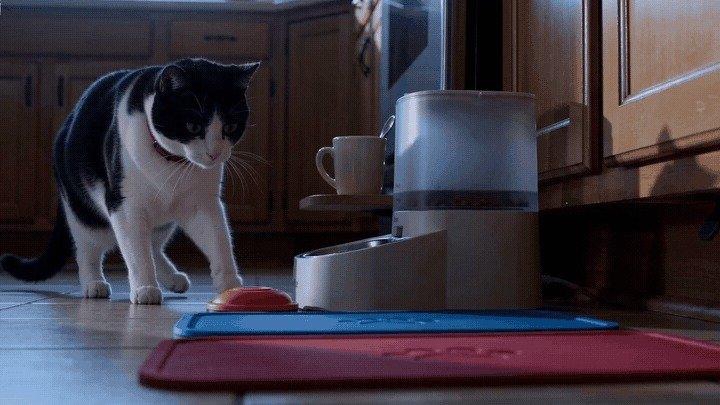
The premise is simple enough to understand without dialogue: one cat, three buttons, one closed feeder. The scene becomes a story when each press has a consequence the viewer can see. An orange button makes a cupboard latch jump, a blue button adds a spoon-and-mug tap, and the red button ends the pattern by opening the feeder.
That cause-and-effect chain matters more than musical complexity. A random collection of noises would make the cat look lucky. Repeated framing and deliberate paw movements make the final result feel like a learned routine.
The Complete Breakfast Mystery in Fifteen Seconds
Each five-second section has one job. The first establishes the rule, the second confirms it, and the third reveals why the cat has been pressing anything at all.
The Orange Button Starts the Pattern
At cool blue dawn, the cat sits beside a matte-cream feeder in a pale-oak kitchen. Three oversized pads in orange, blue, and red form a clear row. The cat presses the orange pad once. A cupboard latch reacts, but the feeder stays shut. The cat looks toward the machine instead of celebrating, so the goal remains unresolved.
The Blue Button Adds a Second Clue
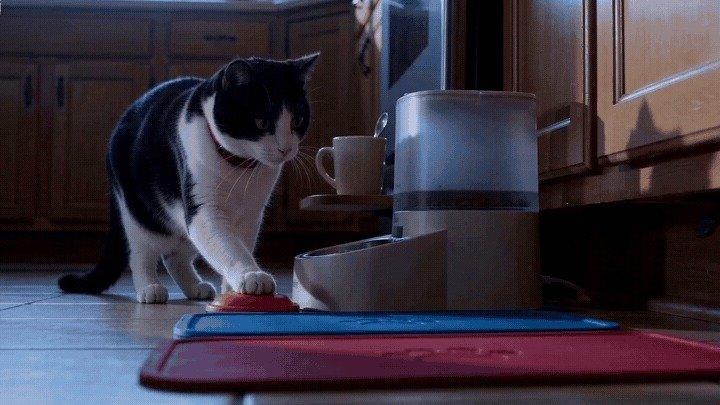
The same low camera and unchanged kitchen continue the action. The cat shifts its weight and makes another deliberate press. A cream mug and teaspoon become the second household response. The feeder still does not open, and the cat’s attention moves toward the final red pad.
The Red Button Reveals the Real Goal
The last press creates the reversal. The feeder lid lifts and a measured portion of kibble drops into the bowl. The cat pauses long enough to acknowledge the result, then leans toward breakfast. What looked like a tiny performance is now understood as a practical morning sequence.
Plan the Timing of Each Button Press and Sound
Before generating a frame, write the sequence as a beat map. This keeps each practical sound attached to one visible source and prevents the middle of the story from becoming noisy or unclear.
| Time | Visible action | Sound cue for the edit | Story purpose |
| 0-5 sec | Paw presses orange; cupboard latch hops | One soft rubber press and one wooden thump | Establishes that a button controls a response |
| 5-10 sec | Cat makes the second press; mug and spoon react | One light ceramic click | Confirms the pattern while keeping the feeder closed |
| 10-15 sec | Paw presses red; feeder opens; kibble lands | Motor hum followed by a short kibble rattle | Reveals that breakfast was the goal rather than performance |
The sounds should arrive just after the paw makes contact. That tiny delay preserves causality: action first, response second. It also gives the viewer enough time to anticipate what the next button might do.
Repeat the Button Pattern Before the Reveal
Three details hold the sequence together: the red collar, the orange-blue-red pad order, and the low cat-eye camera. Their stability lets the response change without making the location feel new. The viewer can therefore spend attention on the escalating result rather than re-learning the scene.
The feeder must also remain closed through the first two beats. If it opens early, the ending loses its purpose. Likewise, the cat should glance toward the red pad before the final section; that look quietly promises one more attempt.
Describe Each Button and Result in Chronological Order
An effective prompt should describe chronology, not just atmosphere. Lock the character and environment first, then state one action and one consequence for each section.
Use a compact instruction hierarchy:
- Continuity: the same realistic black-and-white cat, plain red collar, feeder, kitchen, dawn light, and low camera.
- Action: one paw presses one named color once.
- Response: one specific object moves immediately afterward.
- Boundary: no human hands, duplicate animals, logos, text, extra limbs, or camera cuts.
- End state: define whether the feeder is still closed or has opened.
Separate clips work well here because every section ends in a distinct state. Use the strongest ending frame as the continuity reference for the next prompt, and check collar color, feeder shape, pad order, and paw anatomy before moving forward.
Assemble the Three Breakfast Scenes in CapCut
Start CapCut’s AI video generator with a written sequence that names the orange, blue, and red pads in order. Set a horizontal aspect ratio and a fifteen-second duration so the cat, feeder, and three visible causes can share the frame.
Build each button press as its own scene, then arrange the results in chronological order. Use the available music, effect, and pacing adjustments to place one practical cue after each paw contact and leave a clear pause when the feeder finally opens.
Keep Every Sound Cue Consistent With the Image
Build the audio from quiet kitchen room tone and three restrained practical effects. The wooden thump should sound different from the ceramic click, while the feeder motor and kibble rattle should form a clearly recognizable payoff. Keep every effect brief and centered on the visible motion.
Background music is optional. If used, choose a sparse pulse with space between accents so it does not compete with the household responses. The story needs no narrator: the closed feeder, the repeated presses, and the final bowl explain the cat’s intention.
Check the Feeder Reveal Before Export
Watch the completed sequence once without sound and once with only the practical effects. The silent pass confirms that the physical story is readable; the audio pass confirms that every cue belongs to an object on screen.
Before export, verify that:
- the same cat and plain red collar appear throughout;
- the three pads keep the same order and color;
- the feeder remains closed until the red-button beat;
- each response follows a visible paw press;
- no object duplicates or changes shape between sections;
- the final shot holds long enough to show the opened feeder and the cat’s reaction.
Summary
A strong sound-led short connects every effect to a visible action, repeats a clear rule, and saves the most meaningful result for last. Map the beats, lock continuity, and keep the first two outcomes incomplete so the breakfast reveal lands. Try CapCut’s AI video generator to create the horizontal scenes, then refine their timing and practical sound cues into one coherent 15-second story.


